
Connect Leadvaro to the tools your team already uses
Move selected people and company records into your CRM, automation, or marketing workflow with supported integrations and API access.



AVAILABLE CONNECTIONS
Move reviewed records into your existing stack
Choose the connection based on the next step after research: create CRM records, trigger an automation, or add permitted contacts to a marketing audience.
HubSpot
CRM
Send selected people and company data to HubSpot so your team can create or update supported CRM records without copying fields manually.
Connect
Salesforce
CRM
Move selected Leadvaro records into Salesforce and map supported people and company fields to the objects your sales team uses.
Connect
Zapier
Automation
Use Zapier to connect supported Leadvaro actions with other tools in your workflow, such as task creation, notifications, routing, or list updates.
Connect
Slack
Automation
Sync leads and companies directly to your HubSpot CRM. Automatically create contacts and deals from your LeadVaro data.
Connect
Mailchimp
Marketing
Send permitted contact data to Mailchimp for approved business marketing workflows. Customers are responsible for consent, suppression, and communication rules.
Connect
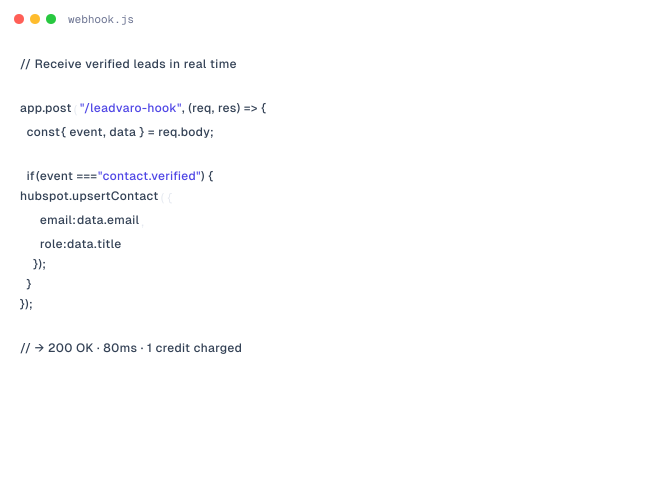
Webhooks
Developer
Sync leads and companies directly to your HubSpot CRM. Automatically create contacts and deals from your LeadVaro data.
ConnectDo not see your tool? Build with the Leadvaro API.
Bring supported search and enrichment actions into your internal tools and prospecting workflows. API access is available on eligible paid plans.
USE CASES
Keep prospect context connected to the next action
Move selected prospect data into the tools your team uses for CRM management, automation, marketing, and internal workflows.
Enrich existing CRM records
Add available people and company fields to supported HubSpot or Salesforce records. Keep important prospect context accessible without repeatedly copying data.
Learn moreAdd selected prospects to your CRM
Choose the reviewed people and companies you want to move downstream. Send only relevant records instead of transferring every search result.
Learn moreTrigger supported workflows
Use Zapier to connect supported Leadvaro actions with tasks, notifications, routing steps, or list updates in other tools.
Learn morePrepare permitted marketing audiences
Move approved contact data into Mailchimp for relevant business campaigns. Apply your own consent, suppression, and opt-out requirements before outreach.
Learn moreReduce manual data entry
Map supported fields between Leadvaro and connected tools. Give your team more time for research, qualification, and outreach.
Learn moreBuild custom processes with the API
Use API access when a native integration does not match your workflow. Bring supported search and enrichment actions into internal applications or automated processes.
Learn moreFAQs
Frequently asked questions
Find answers about available features, pricing, and Credit.
What is Leadvaro?
Leadvaro is a company-first B2B prospecting platform that helps teams find target companies, identify relevant professionals, and access available business contact data in one workflow.
Which Leadvaro search tool should I start with?
Start with Company Search when account fit comes first, People Search when you know the role you need, Domain Search when you know the company, and Lead Finder when you want prospects matching a complete ICP.
Does searching in Leadvaro use credits?
No. Searching, filtering, browsing, and reviewing records use 0 credits. An available professional email costs 1 credit, while an available mobile number costs 10 credits.
What information can I use to find and qualify prospects?
Available filters include job title, seniority, department, location, skills, industry, employee count, revenue, technology, funding, traffic, and other professional and company attributes.
How current and accurate is Leadvaro’s data?
Leadvaro reports 98% data accuracy, runs re-verification across data signals 24/7, and refreshes the complete database every seven days. Individual field availability may still vary by record and market.
Can I try Leadvaro without a payment card?
Yes. The free plan includes 100 monthly credits and does not require a payment card. You can search and review records before using credits for available contact data.
START FREE
Start with 100 credits and upgrade when your list volume grows
Create a free account, search your market, and reveal contact data only when you need it. No card required.